
“I had my entire 120-person wedding seated in under 30 minutes.”
Jennifer
NewSeatPlan.io for non-profits: charities get a free, co-branded Event & Venue Manager workspace for a year. Apply now →
A seating chart is a visual diagram showing where guests sit at an event. SeatPlan.io is a free online seating chart maker that lets you create drag-and-drop seating arrangements for weddings, corporate events, and gatherings of any size. No signup required — start designing immediately.
Features include round and rectangular tables, guest list import via CSV, real-time collaboration, PDF and Excel export, and progressive web app support for any device. Plans range from free to Event & Venue Manager for professional event planners.
Page content last reviewed: April 2026.
Trusted By

























Drag tables, drop guests. No spreadsheets, no signup, no learning curve.
Trusted By
Drag tables, chairs, and staging wherever you want them. Your table seating plan matches your venue, not someone else's template.
Upload from a spreadsheet, tag dietary needs and notes, then drag guests to seats in seconds.
A3 PDFs your venue will love, Excel seat lists for catering, and printable name cards for place settings.
Print a QR sign so guests scan and find their own table — or email each guest their seat as an Apple or Google Wallet pass. No app, no account.
Planning a wedding? Start with the wedding floor plan, then our guides cover the wedding table layout for dinner and the wedding ceremony seating plan for the vows. Want a head start? Open one of our editable table seating chart templates and change it to fit your room. Keeping the guest list in a spreadsheet? Start from our Excel & Google Sheets seating chart templates.
Seat every guest at your reception. Start from a layout for 50 to 160 guests, keep couples and families together, then print the chart for your venue and a sign for the door.
Plan your wedding seating chart online, from the first table to the printed sign.
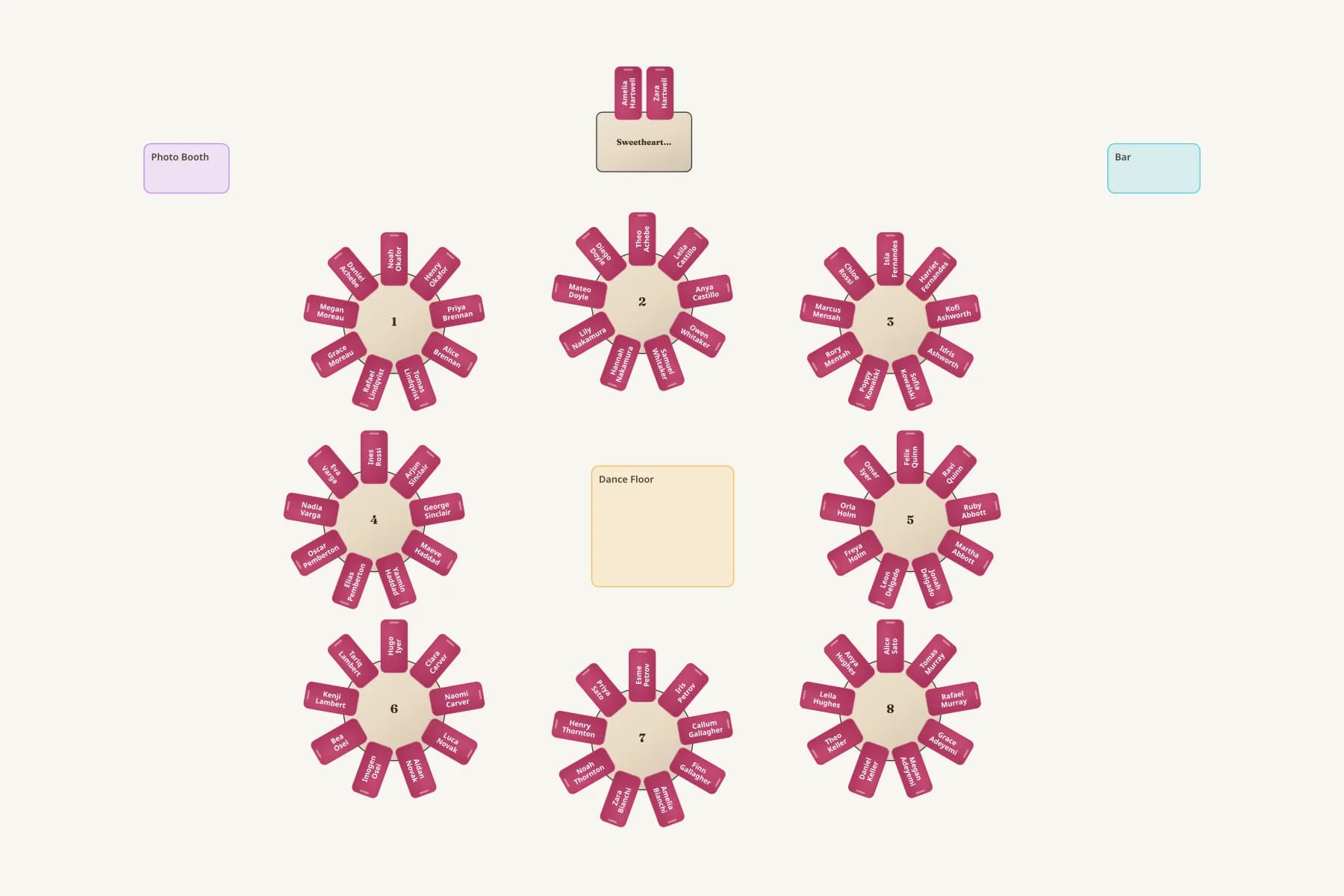
200 guests. 8 dietary requirements. 4 wheelchair users. 1 complicated family tree. SeatPlan.io handled all of it.
For wedding planners, venues, and corporate teams who manage multiple events — and collaborate with the people involved.
Turn any floor plan into a seating chart. Upload a photo or PDF and AI builds the layout for you — a real head start you review in the designer. Every plan includes AI imports, and the free designer lets you try two; Event & Venue Manager adds exact-scale CAD/DXF (see how the AI floor-plan import works). Weighing tools? Read our event floor plan software comparison.
Build a template, reuse it for every event. Never start from scratch.
Send clients a link. They see updates live, make changes you approve, and nobody loses track of the latest version.
Real-time collaboration. Your team edits together, no stepping on toes.
Issue a check-in link for the team running the door, a QR sign so guests find their own table, or wallet passes that update themselves when seats change — names and status without exposing your full layout.
“I had my entire 120-person wedding seated in under 30 minutes.”
“The collaboration feature is a game-changer. No more back-and-forth emails.”
“I tried all the other services. None of them even come close.”
“6 hours on paper. 11 minutes on SeatPlan.io.”
“200 guests. 1 complicated family tree. SeatPlan.io handled all of it seamlessly.”
Try the full designer with no limits. Only pay when you want to save or collaborate.
Registered non-profit or charity? Apply for a free co-branded Event & Venue Manager pass →
| Category | Feature | Solo | Save & export | Most popular | For teachers | For professionals |
|---|---|---|---|---|---|---|
| Free | Pro | Collaborate | Classroom | Event & Venue Manager | ||
forever | one-time payment pay once — not a subscription | one-time payment pay once — not a subscription | per school year when billed annually | per month when billed annually | ||
| Design | Full Design capabilities | Included | Included | Included | Included | Included |
| View & edit charts in 3D | Not included | Included | Included | Included | Included | |
| Import your guest list | Included | Included | Included | Included | Included | |
| AI floor-plan import (photo, PDF) | 2 to try | 3/month | 3/month | 1 to try | 10/month | |
| CAD (DXF) imports at exact scale | Not included | Not included | Not included | Not included | Free | |
| Save & Export | Save your work | Not included | 90 days | 90 days | Unlimited | Unlimited |
| Version history & restore | Not included | Included | Included | Included | Included | |
| PDF exports | Not included | Included | Included | Included | Included | |
| Collaboration & Guests | Collaborators | Not included | Not included | Up to 2 | Not included | Unlimited |
| Real-time editing | Not included | Not included | Included | Not included | Included | |
| Share via link | Not included | Not included | Included | Not included | Included | |
| Guest QR seat finder | Not included | Not included | Included | Not included | Included | |
| Apple & Google Wallet seat passes | Not included | Not included | Included | Not included | Included | |
| Wedding photo sharing | Not included | Not included | Add-on | Not included | Add-on | |
| Event workspace: checklist, run sheet, files & handoffs | Not included | Not included | Not included | Not included | Included |
Save + invite others for real-time editing across your charts.
pay once — not a subscription