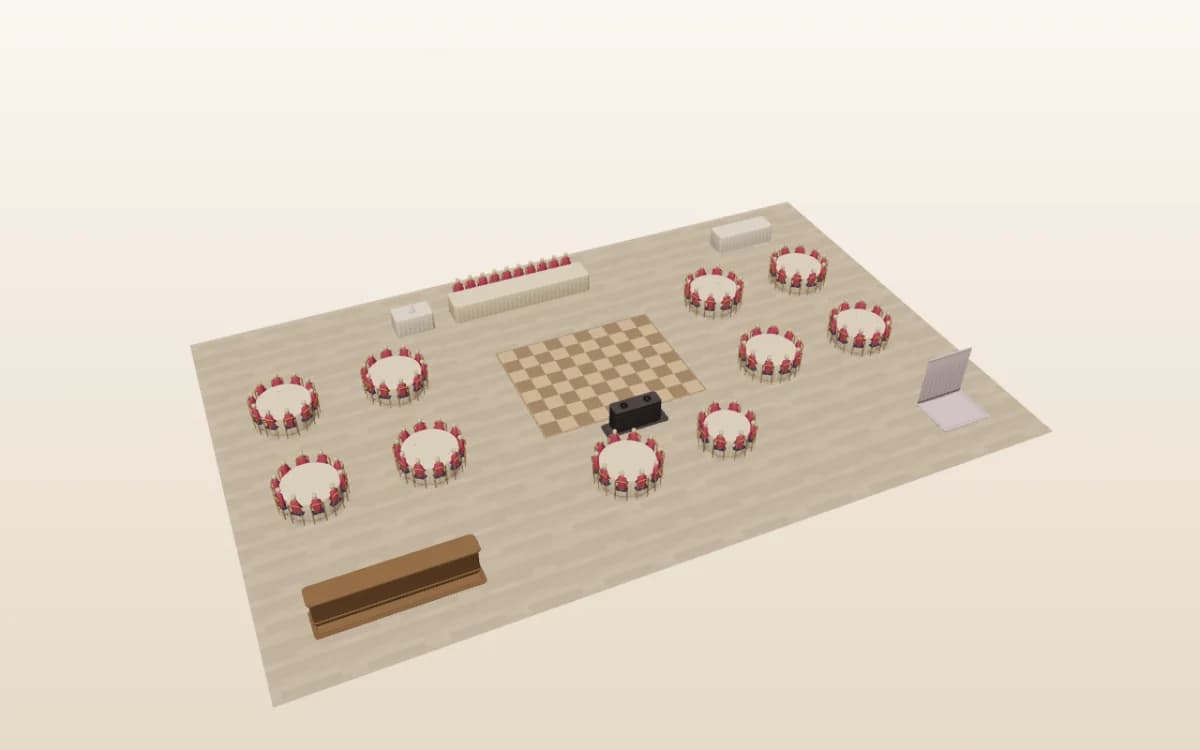
Wedding seating chart template: pick your guest count, then seat everyone
Seven reception layouts for 30 to 160 guests, sized by guest count and table style. Filter by how many people you're inviting, the tables your venue has and where the two of you sit. Each template opens in the designer, ready for your guest list, with no account needed.
Guests
Tables
Couple's table
Showing 7 of 7 wedding templates
Wedding seating chart templates by guest count
Every range is a starting point. Add or remove tables in the designer until the seat count matches your RSVPs. You can drag the tables in each preview, too.
Try it — drag a table
Intimate Celebration
30–60 guests
Small & intimate
A sweetheart table plus 6 round tables of 8 — cozy without feeling cramped.
Suits:
Couples with a short guest list who want every table close to them.
Reception:
A restaurant room, a small garden marquee or a boutique hotel.
The couple:
You two sit at a sweetheart table at the top of the room, facing six rounds of 8.
Try it — drag a table
U-Shape
30–50 guests
U-shape
A 10-seat top table joined by two long legs seated on both sides.
Suits:
Small dinners where everyone should see everyone, including speeches.
Reception:
A private dining room, a long barn or a rehearsal dinner.
Between two templates? Pick the one with spare seats and remove a table. Your venue's floor plan wins over any template, so check where the doors, bar and dance floor sit before you seat anyone. The wedding floor plan guide covers spacing and room shapes.
How to fill in your wedding seating chart template
Import your guest list. Upload a spreadsheet or CSV, or bring your list over from a wedding website. Here is how to import a guest list from The Knot, Zola or Joy. Give each guest their own row, plus-ones included.
Place the couple's table. Decide between a sweetheart table and a head table first, because it fixes the front of the room. If you are torn, compare head table vs sweetheart table.
Seat family and the wedding party. Parents, grandparents and the wedding party go nearest to you. Give divorced parents their own tables at the same distance. Our wedding seating etiquette guide covers the tricky cases.
Fill the rest by group. Seat whole friend groups together: university friends, work friends, neighbours. Drag a group onto a table, then move single guests next to someone they know. Leave one or two spare seats for late RSVPs.
Print or share. Export a PDF for the venue and your welcome sign, or send your planner a live link. For the display itself, see these wedding seating chart display ideas.
Walk around your room before the day: every table, chair and guest where you put them, with the dance floor and bar in place. The 3D seating chart comes with Pro, Collaborate and Event & Venue Manager.
A good template gives you a guest list, a table layout that matches your venue, a seat for every guest and a version you can share. Check yours has these six.
Table numbers or names
Every table on the chart matches the card on the real table, so guests and staff agree on which is which.
Guest names, one per seat
Plus-ones and children get their own seat. Write "Guest of" when you don't know a name yet.
Meal choices
Each guest's meal and dietary needs, counted per table, so the caterer can plate the right dishes.
Accessibility seats
Seats near an exit and the restrooms for guests who use a wheelchair or a walker, with room to pull up.
A vendor table
Seats for the photographer, the DJ or band and the coordinator, away from the dance floor speakers.
A kids' table
Children over about 6 often enjoy their own table, near their parents and away from the bar.
Standard table sizes
60-inch round
Seats 8
The most common reception table, with room for place settings and a centrepiece.
72-inch round
Seats 10
Good for big families. It is a little harder to talk across.
8-foot banquet table
Seats 8 to 10
Four a side, plus one at each end. Line several up for family-style dining.
Plan for comfort, not the maximum. Leave at least 60 inches between tables so servers can pass, 24 inches behind each chair when it is pulled out, and 36 inches from the walls. The test of a good template: when a guest changes tables a week before the wedding, you update one place, and the counts follow.
A QR seat finder. Guests scan a sign and see their table on their phone. Print one from the QR seating chart sign templates.
Wedding seating chart template FAQ
Where can I find a wedding seating chart template?
You can start from a template in an online seating chart designer, download a printable PDF, or use an Excel or Google Sheets version. SeatPlan.io offers seven wedding layouts for 30 to 160 guests that open in its designer, plus printable PDFs and spreadsheet versions. Pick the layout closest to your guest count and room.
Which wedding seating chart template should I use for my guest count?
Match the template to your guest count and room shape. Around 50 guests suits an intimate layout or a U-shape, 60 to 90 suits long banquet tables or rounds with a sweetheart table, and 100 or more suits classic rounds or a ballroom layout. Then adjust table numbers to your venue's real floor plan.
What is the best way to make a seating chart for a wedding?
Start with your final guest list, grouped by family and friendship circles. Place the couple's table first, then parents and the wedding party nearby, then fill the remaining tables group by group. An online template lets you drag guests between tables, catch conflicts early, and print or share the finished chart with your venue.
Is there an app for a wedding seating chart?
Yes. SeatPlan.io runs in the browser on a phone, tablet or computer, so there is nothing to install. Open a wedding template, import your guest list and drag guests onto seats. Paid plans add saving, a PDF with every name, a live link for your partner or planner, and the 3D view.
What is the cheapest way to make a wedding seating chart?
The cheapest route is a template you fill in yourself: a spreadsheet, a printable PDF, or an online designer you can plan in without paying. Keep the chart digital until RSVPs close so late changes don't mean reprinting anything, then spend only on the display, such as a printed board or a mirror.
Should a wedding seating chart be alphabetical or by table?
Alphabetical charts are faster for guests at weddings over about 100 people, because each person finds their own name without scanning every table. Charts listed by table suit smaller weddings and look tidier on a display. Either way, include table numbers that match the cards on the tables and print names large enough to read.
Start from a wedding template
Open the designer and pick a layout, or start from a blank room. For planning help beyond templates, see the wedding seating chart guide or the seating chart maker.