Table plan maker
The table plan your venue asked for, finished tonight
Drag your guests onto the tables you actually booked, then print the plan for the easel and the place cards for every seat from the same file. No account to open the planner.
- No account to start
- Every name on its chair
- Print-ready PDF
As seen in Mashable“7 best wedding planning apps for 2026 couples”
“Took me 6 hours to seat 80 people on paper. Took me 11 minutes on SeatPlan.io. The time savings alone made it worth it.”
The night before
The venue wants the table plan by Friday. Your spreadsheet has stopped making sense.
Column B is table numbers, column C is who cannot sit next to whom, and every time a cousin drops out four rows move. Nobody can see the room in a spreadsheet, so nobody spots that table 9 is wedged behind the DJ until the day. A table plan is a picture of the room. Build it as one.
Draw the room you booked
Long tables, rounds, a top table: lay out the real room
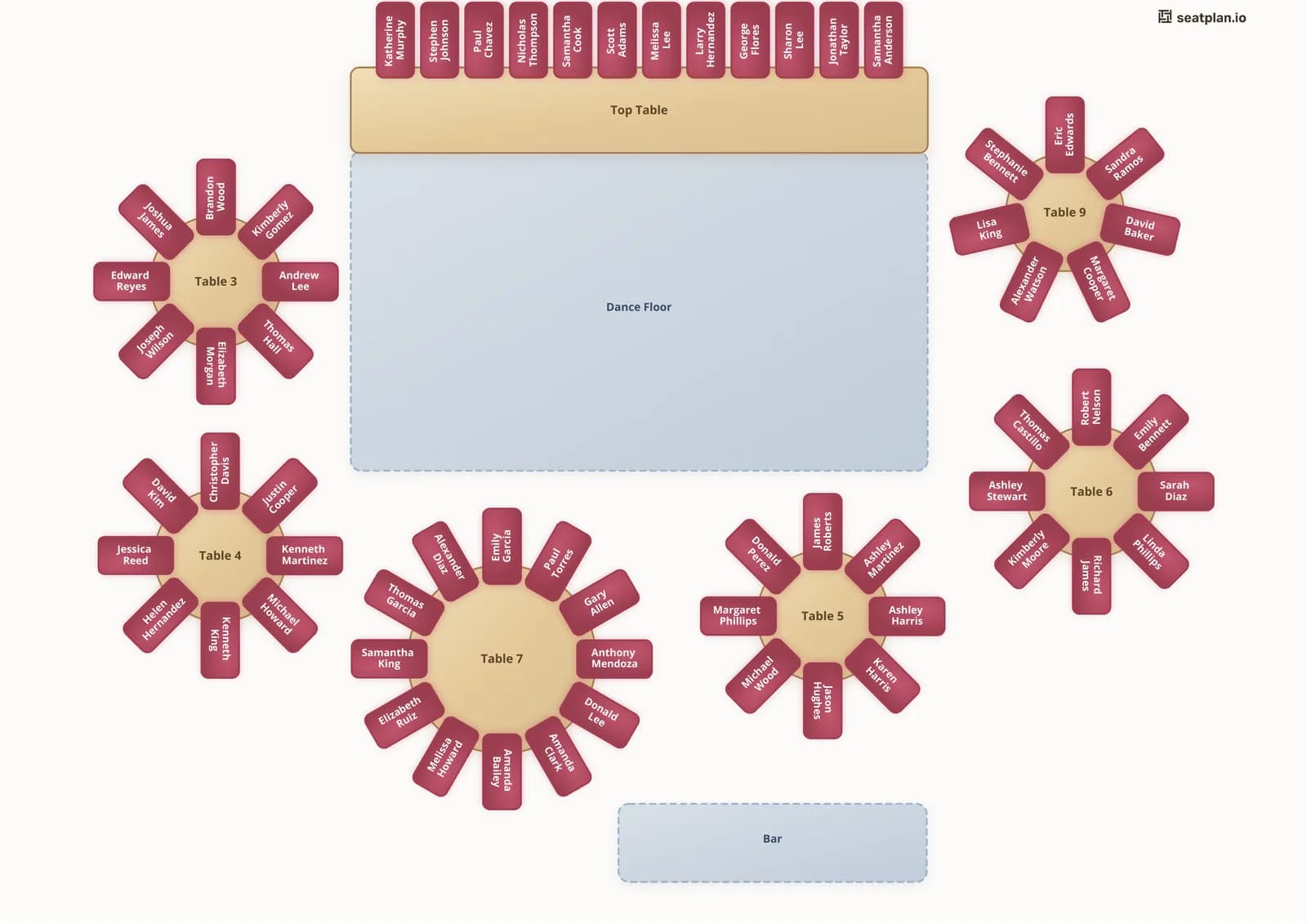
Start from a template or an empty canvas and put the tables where the venue put them, with the bar and dance floor as real objects to plan around. Paste your guest list from a spreadsheet or import the CSV, then drag each guest onto a chair. Search a name when the list is long, and open seats show as numbers so you can see who is still unplaced.
- Rounds, long banquet tables, top and sweetheart tables, chair rows
- Guest list import with dietary notes attached to each name
- Free to design the whole plan, however many tables
Print everything from one plan
The easel board, the place cards and the caterer’s list from the same file
Once every guest has a chair, the exports write themselves. The table plan PDF goes on the easel by the door. The place cards fold four to a page with each guest's name, table and seat and their dietary note. The guest list by table goes to the caterer. Move one guest and every printout follows.
- Table plan PDF for the door, sized for print
- Foldable place cards with dietary notes
- Guest list grouped by table for the venue and caterer
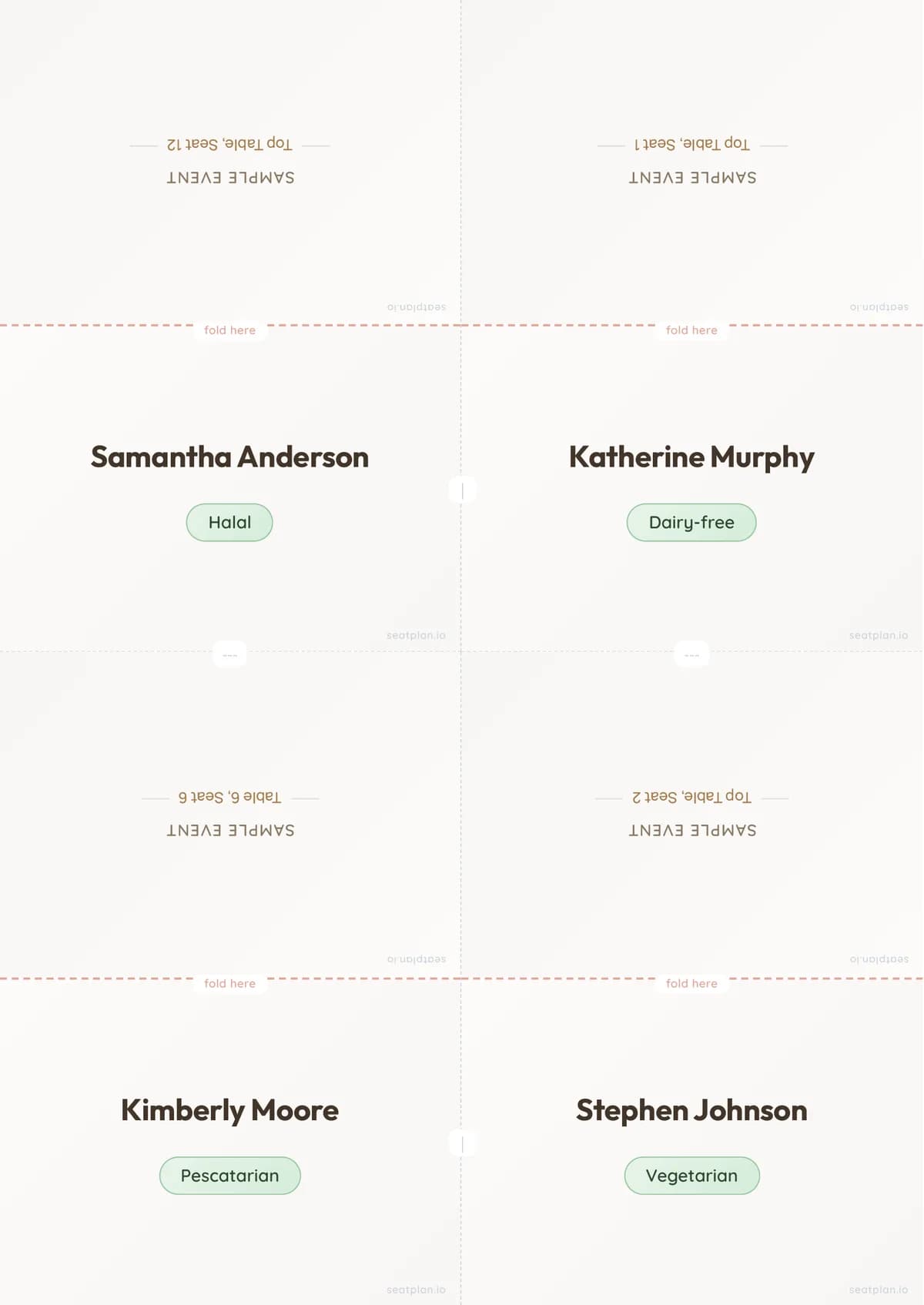
Table plan questions
What is a table plan?
A table plan is the sheet that tells every guest which table they are on. In the UK and Ireland it usually stands on an easel at the door of the reception; the venue and caterer work from a copy. Americans call the same document a seating chart.
Can I make a table plan for free?
Yes. The designer opens without an account. Place your tables, import or paste your guest list, and drag every guest into place. You pay a one-time fee only when you want to save the plan and download the print-ready PDF.
What does the printed table plan look like?
It is your room as you drew it: each table with its name and every guest's name on their chair, with the dance floor, bar and top table where you placed them. The PDF is sized for printing, so the easel board at the door is the same plan the venue and caterer hold.
Can I print place cards from the same plan?
Yes. The place card export folds four to a page, each with the guest's name, their table and seat, and any dietary note you recorded for them. Change a seat in the plan and re-export; nothing has to be retyped.
What if the guest list changes after I print?
Open the plan, drag the guest to the new table, and export again. The table plan, the place cards and the guest list by table all come from the same assignments, so one edit updates every printout.
Does it work for long tables and a top table?
Yes. Rounds, long banquet tables with guests down both sides, a top table with everyone facing the room, sweetheart tables and chair rows are all in the free designer, along with the dance floor, bar and other areas you need to plan around.
Finish the table plan tonight.
Open the planner, drop every guest on a chair, and only pay when you want to save it and print.