On every plan · New · Beta
Turn any floor plan into a seating chart
Upload a photo, screenshot, PDF, or CAD file of the venue. AI reads the tables, seat counts and areas — or a DXF imports to exact scale — so you start seating guests instead of redrawing the room.
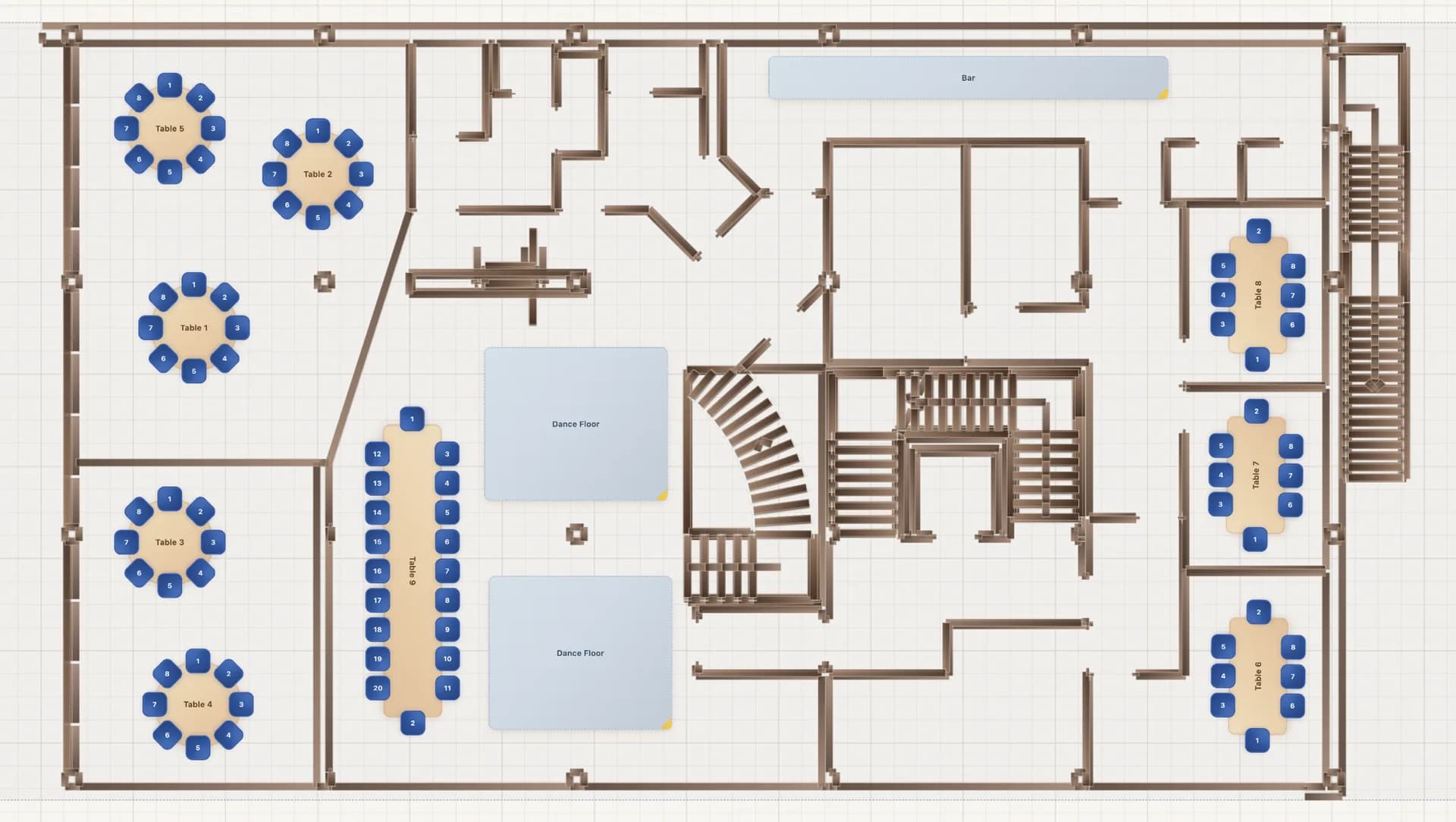
AI floor plan import works on every plan — the free designer includes two imports to try, no signup needed; Pro and Collaborate include 3 a month and Event Manager 10. Exact-scale CAD (DXF) imports come with Event Manager.
AI floor plan import takes a venue plan you already have — a photographed printout, a screenshot of an old chart, a PDF banquet sheet, or a CAD (DXF) export — and builds a starting seating chart inside SeatPlan.io. Tables, seat counts and special areas come in as real, editable elements, so the slow part — recreating the room — is already done.
One upload. Three ways in.
Use whatever the venue gave you. SeatPlan.io picks the right path automatically.
Photos & screenshots
Snap the planner’s printout or screenshot an existing chart. The AI reads the tables, seat counts and areas. Uses one AI import.
PDF plans
Drop in a banquet event order or a printable seating chart. PDFs are read natively — no flattening or converting first. Uses one AI import.
CAD blueprints (DXF)
Walls, columns and room geometry import to exact scale from the architect or venue. Free and unmetered with Event Manager — never uses an AI import.
From file to floor plan in three steps
1. Upload your plan
In the designer, hit AI Import Floor plan and add your file — Event Managers can also start from New template → AI import in the Events dashboard. Optionally enter the real room size in metres or feet.
2. AI reads the layout
Tables, seat counts and special areas are detected and placed on the canvas. A DXF comes in to exact scale, no interpretation needed.
3. Refine in the designer
Open the template, tweak anything that needs it, then save it to reuse for every booking at that venue.
What it pulls out of the plan
Tables & seat counts
Round, rectangular and square tables with the right number of seats per table — distinguishing guest tables from head tables and service stations.
Special areas
Dance floors, stages, bars, cake tables, pillars and walls come in as labelled areas so the room reads the way it really looks.
Room dimensions, to scale
Enter the real room size in metres or feet and the layout is built to those proportions. With a DXF, the scale comes straight from the drawing.
A real starting point
Everything lands as editable elements in the designer — not a flat picture — so you can drag, resize and reseat exactly as you would on a layout you built from scratch.
Included with every plan
Try it before you pay a penny. Every paid plan includes a monthly allowance, and Event Manager adds free CAD imports and a cheap top-up for busy months.
2
Free, to try
Two AI imports in the free designer. No signup, no card.
3
Per month, every paid plan
Pro, Collaborate and Event Manager. Resets on the 1st.
Free
CAD (DXF) imports
Exact-scale blueprints on Event Manager — never count against the AI allowance.
+10
Top-up for $8
For busy Event Manager months. Purchased imports never expire.
A quick, honest note on beta
The importer is new and still learning. CAD files import with exact measurements; photos, PDFs and screenshots are read by AI, so a table or seat count can occasionally be misread — always review the result in the designer before you rely on it. If an import looks off, send us the file or a screenshot: every example you share directly teaches the importer and makes the next one better.
Common questions
What can I upload to import a floor plan?
Photos and screenshots (PNG, JPG, WebP, GIF, SVG), PDFs, and CAD files (DXF). Images and PDFs are read by AI, which detects your tables, seat counts and areas. DXF files import with exact measurements straight from the venue or architect. Files can be up to 12 MB.
Does it really work from a photo or screenshot?
Yes. Snap the planner's printout, screenshot an existing chart, or drop in a banquet event order. The AI reads the layout — round and rectangular tables, seat counts, dance floors, stages and bars — and turns it into editable tables you can refine in the designer.
How accurate is the AI import?
It gives you a real head start instead of a blank canvas. CAD (DXF) files import to exact scale. Photos and PDFs are interpreted by AI, so a table or seat count can occasionally be misread — you review and adjust everything in the designer before you rely on it. The importer is in beta and improves as more plans are imported.
How many AI imports do I get?
The free designer includes 2 AI imports to try, no signup needed. Pro and Collaborate include 3 AI imports every month and Event Manager includes 10, reset on the 1st (UTC). Event Managers who need more in a busy month can add a pack of 10 extra imports for $8 — purchased imports never expire. CAD (DXF) imports on Event Manager are always free and never count against the monthly allowance.
Which plan includes AI floor plan import?
Every plan. The free designer lets you try two imports without signing up; Pro and Collaborate include 3 a month and Event Manager 10. Exact-scale CAD (DXF) import is part of Event Manager, the plan built for planners, venues and agencies, alongside reusable templates, live client collaboration, guest check-in and unlimited events.
Can I set the real room size so the layout is to scale?
Yes. When you import, you can enter the real room dimensions in metres or feet and the layout is built to those proportions. With a CAD (DXF) file the scale comes straight from the drawing.
Stop redrawing the room
Import the plan you already have and start seating guests. Your first two AI imports are free in the designer — no signup needed.