Drag-and-drop seating chart
A drag and drop seating chart you can change faster than the guest list does
Pick up a table and the room moves with it. Pick up a guest and drop them on a chair, or on another guest to swap the two. Try it on the room here, then open the free designer with your own list.
- No account to start
- Drag tables, guests and groups
- Undo anything
As seen in Mashable“7 best wedding planning apps for 2026 couples”
“The drag-and-drop interface is so intuitive. I had my entire 120-person wedding seated in under 30 minutes. It would have taken me hours with spreadsheets.”
The third revision
Every change in the spreadsheet is four edits. In the room it is one drag.
A cousin cancels, a plus-one appears, two friends fall out. In a spreadsheet each of those is cut, paste, renumber, recount, and hope nobody vanished. On a chart you drag the name to the new chair and look at the room to check it. That is the whole difference, and it is why the third revision takes minutes instead of an evening.
The list beside the room
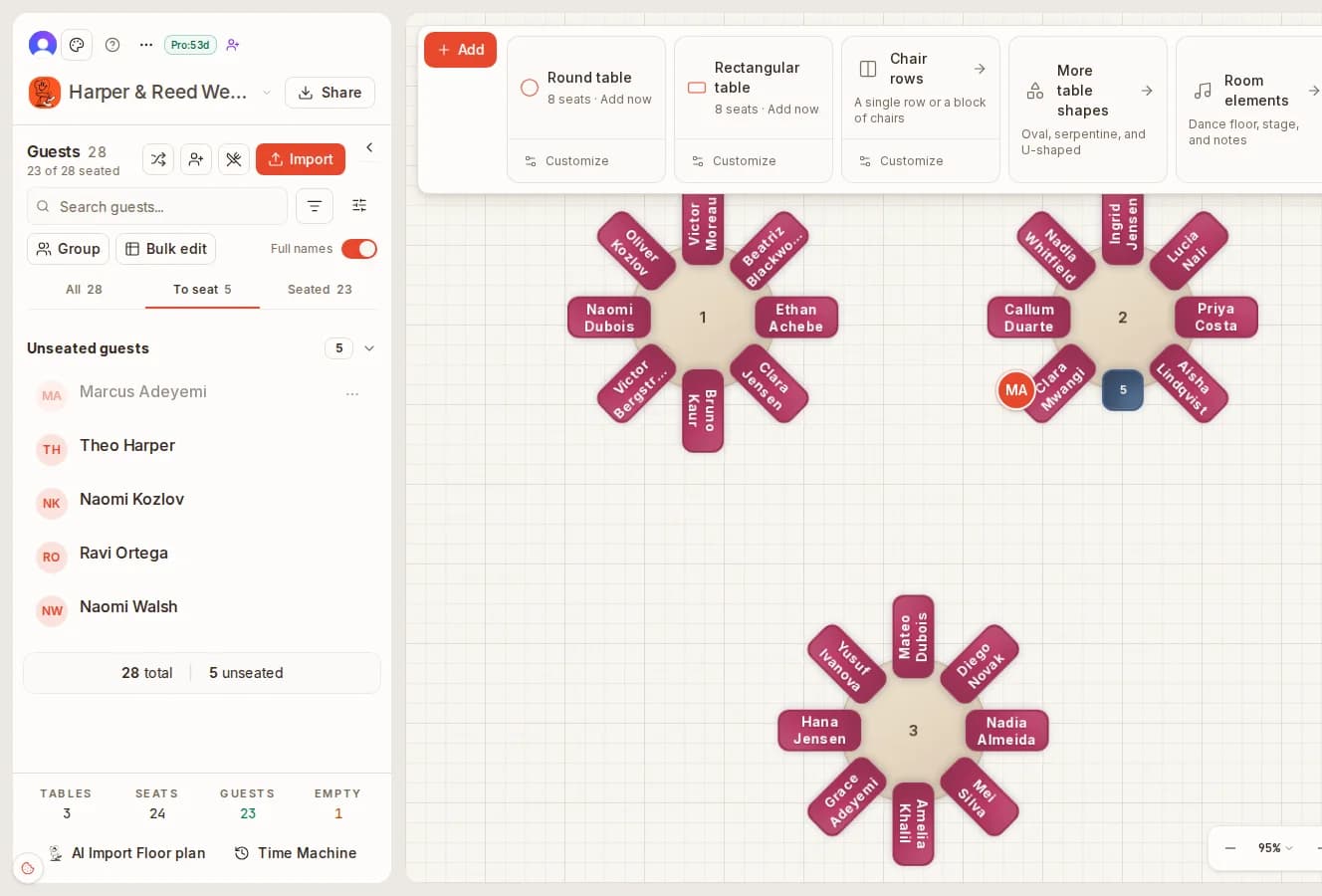
Your guest list sits next to the chart, so seating is a drag, not a lookup
Import the spreadsheet once. The panel shows who is seated and who is still to seat, with a search box for the long list. Drag a name onto a chair and it is placed; the count of guests still waiting drops by one. Bulk edit and groups handle the family of six without six drags.
- Seated and to-seat tabs with live counts
- Search a name instead of scrolling
- Groups and bulk edit for families and tables of friends
One drag, two moves
Drop a guest on another guest and they trade seats
The most common seating edit is a swap: two people who would be happier at each other's tables. On the chart you drag one onto the other and both move, with no empty chair left behind and nothing to renumber. If it looks wrong, undo.
- Drop on an empty chair to seat, on a guest to swap
- Drag a guest off the table to unseat them
- Undo and redo every move
Before
After
Keep exploring
More ways to plan visually.
Drag-and-drop questions
What is a drag-and-drop seating chart?
A picture of your room that you edit by moving things. Tables are objects you pick up and put down, and guests are names you drag from a list onto a chair. There are no rows to retype: when a table moves, its chairs and the names on them move with it.
Is drag-and-drop really faster than a spreadsheet?
For seating, yes, because most changes are moves. Swapping two guests in a spreadsheet is four edits and a check that you did not lose someone; on the chart it is one drag onto the other guest and both trade places. Keep the spreadsheet for collecting RSVPs and import it when you are ready to seat.
Can I try the drag-and-drop planner free?
Yes. The chart at the top of this page is the real preview, and the designer opens without an account. Place every table and seat every guest for free; a one-time payment saves the chart and unlocks the PDF exports.
What happens when I drop a guest on an occupied chair?
The two guests swap seats. Drop a guest on an empty chair to seat them, drag them off the table to unseat them, and use undo if you change your mind.
Can I move a whole group at once?
Yes. Put guests in a group, such as a family or the bride's colleagues, then drop the group on a table and every member takes a free chair in one action instead of one drag per person. Bulk edit sets the dietary note, meal or group for several guests at once.
Can two people work on the chart at the same time?
Yes, on the paid plans. Collaborate lets you invite two people and Event Manager as many as you need; everyone edits the same chart live and sees each other's changes as they happen, so you and your planner or your partner can seat different sides of the room at once.
Seat the room in one sitting.
No account, no download. Import the list, drag every guest to a chair, and only pay when you want to keep it.